Step 2) - After you ensure you are Jailbroken you must launch Cydia, tap the Manage Tab, tap the Sources section and finally tap the Edit button in the top right corner of the screen.
Step 3) - You should now see an Add Button appear in the top left corner of the screen. Tap the Add button now and type in the following source:
http://cydia.hackulo.us/
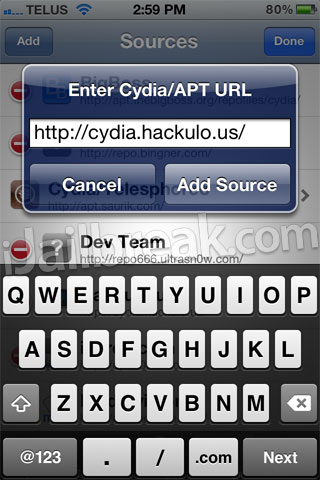
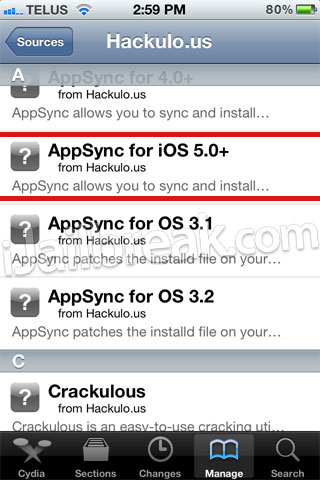
Step 4) - With the Hackulous source now added into Cydia go into the Hackulous source by tapping on it and you should see AppSync for iOS 5.0+. Install AppSync for iOS 5.0+ and then restart your iPhone, iPod Touch or iPad.
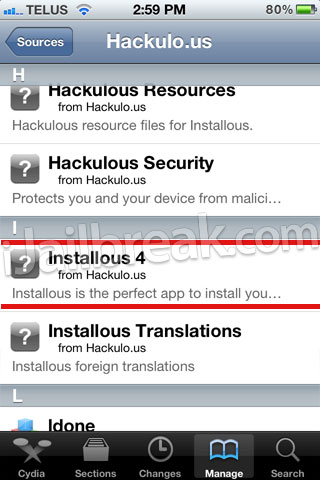
After it has restart, launch Cydia again and install Installous for iOS 5.1.1 (Installous 4) to your iOS device.
You now simply need to find Installous on your SpringBoard (homescreen) and you can begin installing cracked applications on your iOS device running the iOS 5.1.1 or 5.1 firmware. If you have any further questions please leave them in the comments section.
Note: iJailbreak.com does not support cracked applications. As it is our promise to report on everything to do with Jailbreaking, however, we have a responsibility to report on such news. If you followed this guide please keep in mind installing crack applications are illegal.

Tidak ada komentar:
Posting Komentar